
ClickUp Pricing
- Productivity pricing
- $7/mo at the smallest
- Free plan
ClickUp pricing starts at $7 a month, which is $84 over twelve months. There is a free plan, and a trial on the paid tiers: 14 days on Business.
Opens the vendor's own pricing page. Figures here were read from it on 19 August 2026.
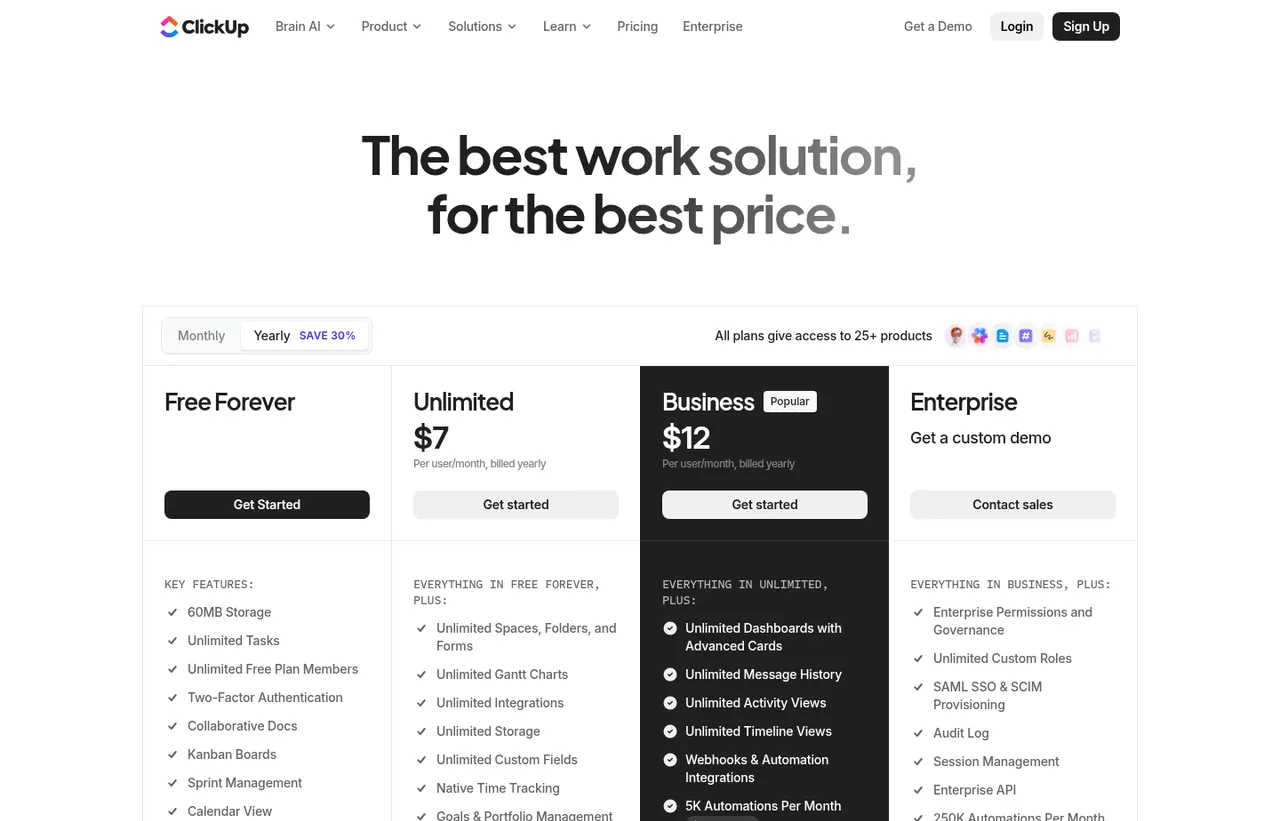
ClickUp pricing at a glance
| Entry price | Free Forever plan; Unlimited from $7 per user/month billed yearly |
|---|---|
| Smallest invoice | $7 a month, or $84 a year |
| How that is reached | Unlimited at $7 a month |
| Seat minimum | None on the entry plan |
| Free plan | Yes |
| Free trial | 14 days on Business |
| How it charges | freemium |
| Prices read from | The vendor's own pricing page |
| Last checked | 19 August 2026 |
Every ClickUp plan and what it costs
Read from the vendor's own pricing page on 19 August 2026. Charged as freemium. Free trial: 14 days on Business.
| Plan | Price | Billing | What it is |
|---|---|---|---|
| Free Forever | $0 | per month | Unlimited tasks and unlimited free plan members, 60 MB storage |
| Unlimited | $7 | per month | per user, billed yearly - $10 billed monthly. Unlimited storage, integrations and Gantt charts |
| Business | $12 | per month | per user, billed yearly - $19 billed monthly. Advanced automation, timesheets and granular permissions |
| Enterprise | Custom | Negotiated | White labelling, SSO, advanced permissions and managed onboarding |
| Brain AI Add-on | $9 | per month | per user - Unlimited Brain assistant, agent and AI chat, plus 1,500 AI Super Credits a user a month. Charged on top of a plan, not instead of one |
| Everything AI Add-on | $28 | per month | per user - The full agentic suite, with 5,000 AI Super Credits a user a month |
| AI Super Credits Add-on | $10 | per usage | Per 10,000 credits, shared across the workspace, for agents, AI fields and image generation |
What ClickUp costs beyond the advertised price
Each of these is a figure you can check on the vendor's own page. The arithmetic is shown so you can redo it rather than take our word for it.
- Charged on top of a plan$108 a year
ClickUp's AI is an add-on rather than a plan feature, so Unlimited with Brain AI is $16 a user a month rather than $7 - the add-on alone is $108 a user a year.
Working$7 Unlimited + $9 Brain AI = $16 a user a month. The add-on is $9 x 12 = $108 a year.
ClickUp pricing , read 19 August 2026
- Monthly billing costs more$36 a year
Paying monthly instead of yearly adds $36 a user a year on Unlimited: $10 a month against the advertised $7.
Working($10 - $7) x 12 months = $36 a user a year.
ClickUp pricing , read 19 August 2026
Fixed mechanics above add $144 a year to the advertised price. Usage-dependent charges are listed but not summed, because a figure that depends on how much you use cannot be added to one that does not.
What ClickUp actually costs over a year
A monthly price is not the same thing as a monthly contract. These are the plans above resolved both ways, per seat or unit where the plan is charged that way. Where a vendor quotes only a yearly figure it is divided by twelve rather than left out, and the Quoted column says which figure the vendor actually publishes.
| Plan | Quoted | Monthly | Over 12 months |
|---|---|---|---|
| Unlimitedper user, billed yearly | per month | $7 | $84 |
| Businessper user, billed yearly | per month | $12 | $144 |
| Brain AI add-onper user | per month | $9 | $108 |
| Everything AI add-onper user | per month | $28 | $336 |
Cancelling ClickUp, and getting money back
Read from the published ClickUp terms on 18 September 2026. These are the terms, not legal advice: consumer law where you live may give you rights the terms do not mention.
| Refund window | 30 days |
|---|---|
| When you cancel | An annual plan needs at least 30 days' notice before renewal, and that applies to cancelling, reducing user counts and dropping add-ons alike. |
| Changing mid-term | The 30-day satisfaction guarantee covers an initial purchase and an upgrade: exercise it on an upgrade and ClickUp reverts the account and refunds the difference. |
| Your data afterwards | On termination all access rights cease and content is no longer reachable through the account. |
ClickUp terms of service ↗ · read 18 September 2026
ClickUp pricing over time
Read from 17 archived captures of the vendor's pricing page , spanning March 2018 to September 2026. Every figure below links to the capture it came from, so you can check it against the page as it stood on the day.
- Business changed 2 times between 6 March 2019 and 1 September 2026, from $19 to $12 per member.
- Unlimited changed once between 14 March 2018 and 1 September 2026, from $5 per member to $7 per member, up 40% overall.
Business
| Published price | Charged | Seen from | Last seen | Capture |
|---|---|---|---|---|
| $19 | Not stated | 6 March 2019 | 27 August 2020 | Archive |
| $9 | per member | 2 November 2021 | Single capture | Archive |
| $12 | per member | 7 October 2022 | 1 September 2026 | Archive |
- ↔ $19 to $9, between 27 August 2020 and 2 November 2021. One capture quotes per member and the other states no unit, so we cannot confirm the two figures are on the same basis and no percentage is stated. before / after
- ↑ $9 to $12, between 2 November 2021 and 7 October 2022 (+33.3%). before / after
Unlimited
Compiled 18 September 2026 from the Internet Archive Wayback Machine. Plan names were matched against the archived page text and the first currency-anchored figure within 160 characters was recorded, rejecting any figure with a competing plan name standing between it and the name it was matched to. The currency and the unit were read from each capture rather than assumed: captures served in a currency other than $, and captures where no plan name sat beside a figure, are listed as unread rather than dropped. Archived pages show the price as served to the archive's crawler, which may differ by region from the price you are shown.
ClickUp pricing against its competitors
Compared on the smallest invoice each vendor will accept, not on the advertised per-seat rate. Where a product has a seat minimum, the figure below is the minimum times the rate, because that is the cheque you would actually write.
| Product | Cheapest paid entry | Free plan | Against ClickUp |
|---|---|---|---|
| ClickUp | $7 a month | Yes | This product |
| Asana | $21.98 a month | Yes | +$14.98 a month (+214%) |
| monday.com | $27 a month | Yes | +$20 a month (+286%) |
Which ClickUp plan should you buy?
| Your situation | Recommended | Why |
|---|---|---|
| You want to try consolidating tools | Free Forever | Unlimited tasks and members, which is unusually generous. 60 MB of storage is the real cap. |
| A small team needs Gantt charts and unlimited storage | Unlimited | $7 per user billed yearly. The working tier for most teams. |
| You need advanced automation, timesheets and granular permissions | Business | $12 per user billed yearly, and where ClickUp starts replacing several other subscriptions. |
| You want something usable on day one | Do not buy ClickUp | Configuration is the price of the flexibility. Asana or Trello arrive with sensible defaults instead. |
| You need the deepest tool in one specific category | Buy that tool instead | ClickUp is broad rather than deep. Jira beats it at issue tracking, Notion at documents. |
The consolidation argument, priced
The pitch is straightforward. A team paying for a project tool, a document tool, a whiteboard and a time tracker might spend $40 to $60 per person per month. ClickUp Business is $12. Even allowing that each individual component is weaker than the specialist it replaces, the gap is large enough to justify a serious evaluation.
Where it breaks down is when one of those components is load-bearing. If your whiteboard practice is central, Miro is meaningfully better. If documentation is the core asset, Notion is better. Consolidation is worth it when everything is a solid second best, not when one thing has to be excellent.
Configuration is not optional
ClickUp ships with an enormous surface area exposed. Custom statuses, custom fields, ClickApps, automations, views and permissions all need decisions, and the defaults do not make them for you. Teams that assign someone to design the workspace get a coherent system. Teams that let everyone configure their own corner get chaos faster than with simpler tools, precisely because there is more to configure.
Free Forever is unusually generous
Unlimited tasks and unlimited members at no cost is rare, and the constraint is storage rather than people. For a small team this is genuinely workable long term, and it makes evaluation easy: run it in production for a month before paying anything.
AI is a second subscription
The consolidation argument above compares $12 a user a month with $40 to $60, and AI is where that comparison needs a footnote. ClickUp’s AI is not a feature of the plan; it is priced beside it:
| What | Price | On top of |
|---|---|---|
| Brain AI | $9 per user a month | Any plan |
| Everything AI | $28 per user a month | Any plan |
| AI Super Credits | $10 per 10,000 | Either AI plan’s allowance |
So a team on Unlimited that wants the AI features pays $16 a user a month, not $7 - which is above Asana Starter, where AI Studio Basic is included with a credit allowance. Every other comparable productivity product we price puts some AI inside the plan.
Whether that matters depends entirely on whether you were going to use it. What it is not is included.
What the reviews consistently say
Two complaints recur across years of feedback: performance under large workspaces, and a release cadence fast enough that behaviour occasionally changes underneath you. Both have improved and neither has disappeared. If your organisation values stability above capability, that is a real consideration, and Asana is the calmer choice.
ClickUp questions, answered
- Does ClickUp have a free plan or free trial?
- ClickUp has a free plan. A free trial is available: 14 days on Business.
- Can I self-host ClickUp?
- No. ClickUp is a hosted service only, so your data lives on the vendor's infrastructure.
Opens the vendor's own pricing page. Figures here were read from it on 19 August 2026.
What this profile is based on
Nobody here has used ClickUp. This profile is desk research: prices read from the pages cited below, on the dates shown , from one primary source , with 2 captures taken by us . How we research a profile.
Desk research from ClickUp's own pricing page, re-read on 19 August 2026 through a United States egress. Nobody here has configured a ClickUp workspace, so the claim that configuration burden is the commonest reason adoption fails is a reading of the vendor's own feature surface and of published user feedback, not a measurement of ours.
Where ClickUp appears on this site
- Price guide What a SaaS Affiliate Programme Reveals referenced in the guide
- Another profile Basecamp names it as a competitor
- Another profile Linear names it as a competitor
- Another profile Plane names it as a competitor
- Another profile Teamwork.com names it as a competitor
Counts pages on this site that name the product by choice - price guides, pricing question pages, deal records and other profiles. Category and directory indexes list everything automatically and are not counted.
Provenance and freshness
Individually sourced claims
-
Unlimited is $7 per user a month billed yearly, or $10 billed monthly
ClickUp pricing ↗ · checked
-
Business is $12 per user a month billed yearly, or $19 billed monthly
ClickUp pricing ↗ · checked
-
The Free Forever plan includes unlimited tasks and unlimited members with 60 MB of storage
ClickUp pricing ↗ · checked
-
AI is priced separately: Brain AI at $9 per user a month, Everything AI at $28, and AI Super Credits at $10 per 10,000
ClickUp pricing, AI pricing section ↗ · checked
What has changed
-
August 2026
- Corrected free-plan storage from 100 MB to 60 MB, which is what the pricing page now states
- Recorded that AI is a separate per-user subscription - Brain AI at $9 and Everything AI at $28 - rather than a plan feature
- Re-confirmed Unlimited at $7 and Business at $12 per user a month billed yearly
-
August 2026
- Per-user pricing verified, yearly and monthly
- Added plan picker and verdicts
Sources & verification
Facts on this page were read from the sources below on the dates shown. Where a vendor does not publish a figure, we record it as not disclosed rather than estimating it.
- ClickUp pricing - checked 19 August 2026
Spotted something out of date? Email contact@everyany.one and we will re-check it. Corrections are logged on the page.